Safer Internet Day

Today is “Safer Internet Day” and I couldn’t let such an amazing made up holiday go by without giving you some of my favorite personal security
tips. 

Enable Two Factor Authentication.
Google, Facebook, Twitter and hopefully your bank all offer two
factor authentication.  Enabling it adds an extra layer of security to
help protect your accounts. 

Be Smarter About Your Passwords.
A personal password manager (I like LastPass) is a must.  They help ensure you have
amazingly complex and basically uncrackable passwords and helps you to not
commit the security sin of password reuse.

If you dont use a password manager you should follow the 3 basic rules of good passwords: 

15 characters or more. 
Mixture of uppercase, lowercase and special characters. 
Unique for each site you visit. 

Change Your Passwords Often.
No matter how complex your password is it is necessary to change it
regularly. I suggest changing all your passwords at least two
times a year.
Do You Have A Plan?

“If it isn’t documented it cant be a procedure” is what I told a coworker in the meeting before I went to have lunch with a mentor I have had since I was in high school.  

Today he shared with me his completed “Mission, Roles and Goals” worksheet.  I was impressed with his and I was a little embarrassed that I hadn’t spent the necessary time to write down my personal mission statement or goals. 

I will be spending the time to do so tonight but I wanted to share with you the outline he used in hope that you might spend the time to do so also: 

MRG Worksheet Blank.pptx
MRG Worksheet Blank.pdf

Fighting Experience Blindness

How long have you done your job?  
How much does that experience mean to your career?

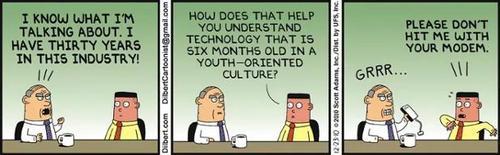
I saw this old Dilbert comic this week and it reminded me that I have been doing network security for about 20 years and cut my teeth securing NT 4 and NetWare servers. 

I know that if I don’t make a concerted effort to stop experience blindness I quickly become the old guy in the comic.  

To do this I try to do the following things:

I read. 
I read /netsec, twitter, Russian hacker blogs, linkedin, mailing lists, white papers, bathroom stalls and anything else I can find about information security. 

I go to conferences and skip the keynotes. 
90% of the conferences I attend have keynotes given by people who make (part) of their living giving keynotes at conferences.  I have heard what they have said, bought their books and dont need to see the same talk they gave last year with new pictures.  I want to be in the room of the kid who has never spoke at a conference before and is likely to throw up and then give the best talk at the conference. 

I make friends with new people in security.
If you are new in the security industry I want to be hear your thoughts before someone who has been doing it as long as I have tells you that you are wrong and you need to be quite. 

I retool ever year. 
If it was up to me I would never sign a contract for a tool over a year in length.  I like to know that the tools I am using are the right tools.  I know people who spend a ridiculous amount of money on the wrong tools because it is easier to keep the tool they have then to go through the pain of retooling. 

What do you do to fight experience blindness?

Protect Yourself Online In 2015

If you didn’t have an account hacked in 2014 (you probably did) you will in 2015. 

Here are my best tips to help protect yourself online in 2015:

Enable Two Factor Authentication
One of the smartest things you can do to protect yourself online is to enable 2FA on all your accounts that offer it.  I wrote about how to enable it here.   

Be Smarter About Your Passwords
A Password manager (I like LastPass) is a must in 2015.  They help ensure you have amazingly complex and basically uncrackable passwords and helps you to not commit the security sin of password reuse.

Have Good Backups
Do you have good backups?  If someone stole your laptop how much stuff would you lose?

For about $200 you can buy all the tools you need to have great backups.

Buy a 1TB+ USB Drive for local backup (I like this WD Drive).
Signup for a Cloud backup service (I like Dropbox Pro).

Then you have to actually make sure you are backing up to the drive and syncing to the cloud for this to be a good strategy.  I have seen a lot of people buy a backup drive and then never back up to it.

Encrypt Your Important Files
You know those important files you have that you dont want anyone else to see? No, not those pictures… the PDFs of your tax returns… how are you protecting them?

You need to encrypt them (and those pictures) so that if someone does steal your computer they don’t have access.  There are a lot of tools both free (I like Ciphershed) and paid you can pick from and use. 

If you follow these 4 tips your information and accounts will be a lot safer in 2015.

Lessons I Learned In 2014

As 2014 draws to a close here is a (not nearly complete) list of the lesson I learned this past year:

Ignore the sign: Jump in the bouncy castle.

There are two ways you can look at your life: What happened to you or What you did. You only get to pick one.

If you want the truth ask a 5 year old.

Find ways to forgive mistakes.

Not every problem has an entirely acceptable solution.

To get things done tell an amazing story.

Travel every chance you get. Travel makes you brave.

Be grateful for every moment you have. Every single one.